
D. When trying to SAVE A FORM I get kicked out
I Cannot Save A Form
1. With Internet Explorer open hold down the ‘Alt’ key on the keyboard. 2. Click on the ‘Tools’ menu at the top of the screen or the small drop-down ’Tools’ menu in the upper-right hand corner. 3. Select Internet Options.
1. With Internet Explorer open hold down the ‘Alt’ key on the keyboard. 2. Click on the ‘Tools’ menu at the top of the screen or the small drop-down ’Tools’ menu in the upper-right hand corner. 3. Select Internet Options.
a) Under the General tab, select the ‘Settings’ button located next to the ‘Delete…’ or ‘Delete Files’ button.
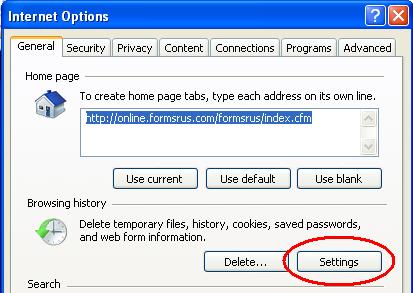
b) Select the first choice ‘Every time I visit the web page’ etc. and then click O.K.
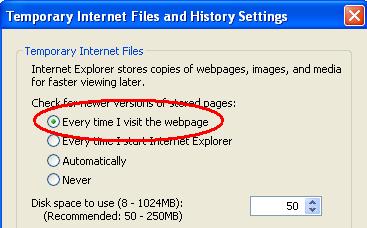
c) Close out of the Internet Explorer, reopen it, and then log back into the forms For Internet Explorer version 5 and 6 users:
The above screen shots-may look slightly different i.e. next to the ‘Settings’ button is ‘Delete Cookies’ and then ’Delete Files’ etc. The ‘Settings’ button still has the same functionality, however.
View All FAQ's in the Related Category:



